
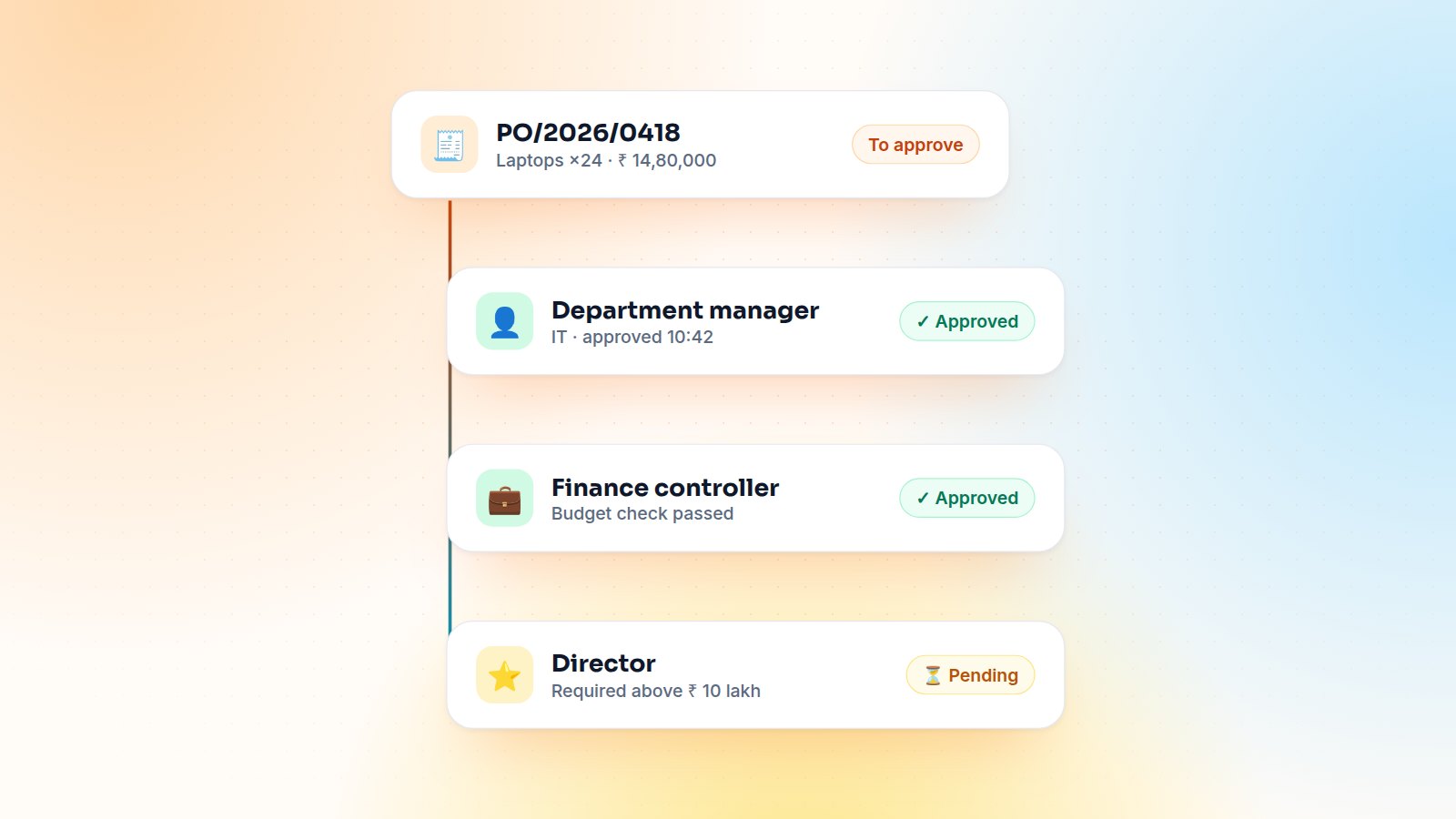
Almost every Odoo implementation I lead has the same conversation in week two: "Who approves a purchase order, and when?" The honest answer in most companies is "it depends": on the amount, on the department, on whether it was budgeted, and on who is on leave this week. In this article I'll show what Odoo gives you out of the box, when that is enough, and how I build multi-level approval chains when it isn't.
What standard Odoo already does
Under Purchase ▸ Configuration ▸ Settings you can enable Purchase Order Approval and set a minimum amount. Orders above that amount stop in the To Approve state until a user with Purchase Administrator rights approves them. Behind the scenes Odoo calls _approval_allowed() on the order, which compares the total (converted to the company currency) with the threshold.
That is perfect for a small team with one decision maker. It stops being enough when:
- you need more than one level (manager, then finance, then director above ₹ 10 lakh);
- the approver depends on the department or analytic account that pays for the purchase;
- approvals must happen before the RFQ is sent to the vendor, not at confirmation;
- auditors want to see who approved what and when, separately from who confirmed the order.
If you are on Enterprise, the Approvals app with purchase requests covers part of this: an employee raises a request, approvers validate it and the request generates the RFQ. For many clients, though, the approval has to live on the purchase order itself, where buyers already work.
Designing the approval matrix
Before writing a line of code I fill a simple matrix with the client's finance team. It becomes the configuration, so business users can change it later without a developer.
| Condition | Level 1 | Level 2 | Level 3 |
|---|---|---|---|
| Up to ₹ 50,000 | Department manager | – | – |
| ₹ 50,000 – ₹ 10 lakh | Department manager | Finance controller | – |
| Above ₹ 10 lakh | Department manager | Finance controller | Director |
| Capex (asset category) | Department manager | Finance controller | Director |
Three rules keep this maintainable: approvers are defined by role or group, never by a hard-coded user; the department comes from the requester's employee record; and every amount is compared in the company currency, so a USD order is treated the same as an INR one.
How the custom workflow is built
The model is small: an approval rule (minimum amount, optional department, approver group, sequence) and approval lines generated on the purchase order when the buyer clicks Request approval. Each line has a state, an approver and a timestamp, and posts to the chatter.
Blocking confirmation until every level approves
class PurchaseOrder(models.Model):
    _inherit = 'purchase.order'

    approval_line_ids = fields.One2many('purchase.approval.line', 'order_id')

    def button_confirm(self):
        for order in self:
            pending = order.approval_line_ids.filtered(lambda l: l.state != 'approved')
            if pending:
                raise UserError(_("%(po)s is waiting for approval from %(who)s.",
                                  po=order.name, who=pending[0].group_id.name))
        return super().button_confirm()
Notifying the right person
When a level is reached, the next approvers get a to-do activity on the order, so it appears in their Odoo inbox and in the activity view, not in an email they will ignore:
line.order_id.activity_schedule(
    'mail.mail_activity_data_todo',
    user_id=approver.id,
    summary=_("Approve %s", line.order_id.name),
)
Lessons from real projects
- Plan for absence. Add a delegate on each approver (or fall back to the group) so a PO doesn't sit for two weeks because one manager is on holiday.
- Reset on change. If someone edits quantities or prices after approval, reset the lines. Otherwise approvals become a formality.
- Don't over-engineer. Three levels cover 95 % of companies. Every extra level adds days to your procurement lead time.
- Report on it. A simple pivot of approval lines by approver and average waiting time shows exactly where the bottleneck is.
Wrapping up
Start with Odoo's two-step validation. Move to the Approvals app if requests come from many employees, and build a custom approval chain when the rules depend on amount, department and budget together. Whatever you choose, keep the rules in configuration, not in code.
Want this set up for your purchase team? Tell me about your approval rules and I'll suggest the simplest design that works.

Gautam Kundaria
Odoo Techno-Functional Consultant with 5+ years of implementing, migrating and customising Odoo for businesses worldwide.
Employee Self-Service in Odoo: Leaves and Expenses Through the Portal
Shop-floor and field staff need to apply for leave and claim expenses, but rarely need the full backend. How I build an employee self-service portal in Odoo, and the security rules that make it safe.
 Gautam Kundaria
Customer Credit Limits in Odoo: Warn, Hold or Block Risky Orders
Odoo can warn salespeople when a customer goes over their credit limit, but it won't stop the order. Here is how to count the real exposure and put risky orders on hold for finance.
 Gautam Kundaria
Odoo POS for Restaurants: QR Payments, Pay-Later Tabs and Table Timers
Floors, tables, kitchen printers and split bills come standard. Here is what I add for real restaurants: QR and UPI payments, pay-later tabs, table time counters and controlled voids.
 Gautam Kundaria